
How to Increase Font Size On iPad
If the default iPad font size is too small for you, then you can easily change it. Before learning how, though, you should know that iOS 7 gives you more font options than previous iOS releases, including bold fonts and increased contrast, so if you haven’t upgraded yet you may want to think about doing it now. In this easy guide you’ll learn how to increase font size on iPad regardless of the iOS version you’re running.
 How to Increase Font Size On iPad with iOS 6 or Earlier
- Go to Settings.
- Tap on General.
- Find the Text Size button and tap on it.
- Notice the slider at the bottom of the screen.
- Move the slider to the right to increase the font size. To decrease the font size, move it to the left.
How to Increase Font Size On iPad with iOS 7
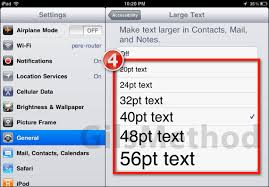
In addition to the method described above, iOS 7 comes with a few additional text options, most notable Larger Type.
- Go to General.
- Tap on Accessibility
- Turn on the Larger Type toggle.
- Adjust the new size of the text. The text size you can choose here is greater than what the Text Size option described above offers you. Moreover, the font will increase in essential iOS apps such as Mail, Messages, Contacts, and Notes, as well as in any other app that supports Larger Dynamic Text.
Under the Text Size options, iOS 7 also includes options for Bold Text and Increase Contrast. Bold Text thickens your font across the system and requires a device restart. Increase Contrast increases legibility by improving contrast on the backgrounds you see in Private Mode Safari, Siri, and Notification Center, and turning overlays from gray to black.
Finally, it’s worth noting that regardless of the iOS version you’re running, you can always manually increase the font size in most apps by pinching to zoom, that is, starting with your thumb and forefinger close together and then spreading them apart to enlarge the content beneath them, or by using smart zoom, which works by double-tapping on the display with one finger to make the content appear bigger while fitting it evenly on the screen.
https://youtu.be/7K6ncbuRmXo