
How to Keep Caps Lock On in iPhone
Trying to emphasize a point or draw attention to certain words? Using your iPhone keyboard, you can caps lock your text so that every new letter you write is automatically written in capital letters. Learning how to keep caps lock on in iPhone will prevent you from having to click the shift key every time you are writing a new letter and can save you a lot of time and effort. To find out more about how to keep caps lock on in iPhone in a few short and easy steps, keep reading.
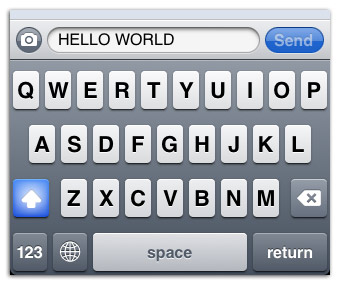
- Open up an editable field such as a text message, an email, or website browser where you plan on writing your message.
- Select the open field and wait for your keyboard to pop up so that you can begin browsing.
- On your keyboard, locate what is called the ‘shift’ key and is indicated by an upwards-facing arrow. It will be on the same row as your backspace key and directly above an icon that shows ‘123.’
- Double-click on this shift key until it lights up blue.
- Finally, begin typing and you will see that every new letter you type will now be in capital letters.
In order to turn this feature off when you are done, just tap the shift key once more and make sure that the key returns to its initial grey state without the blue highlighting. Then when you begin to type again, things will be back to normal and you will be able to capitalize only the letters you need. Now that you know how to keep cap locks on in iPhone, you can follow these steps and avoid the frustrating process of going back and forth to hit the shift key every time you are writing out a message.
https://www.youtube.com/watch?v=wrrHCeqk5BY