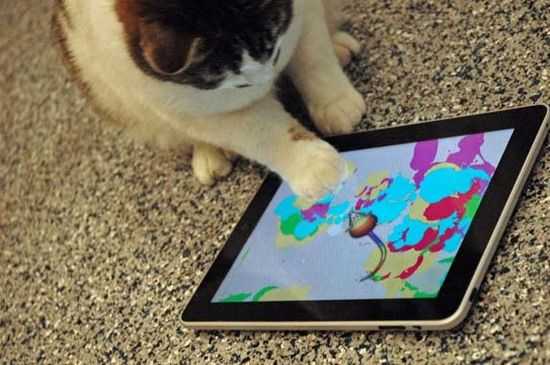
Turn Your iPad Into Your Cat’s New Favorite Toy
The iPad isn’t only for grownups and children, it’s for cats too! There are a couple of awesome apps for pets in the App Store that can turn your device into a wonderful toy for your cat. But before you grab them you’ll want to buy first a nice protective case/screen for your device, to make sure that no furry paws will scratch it. 
Enjoy with Cat
If your cat isn’t familiar with your iPad, you’ll want to get him or her used to it gradually. It’s good to start with Enjoy with Cat, a game that you can play together with your cat. The game is straightforward. You choose a virtual toy – a hamster or maybe a goldfish? - and you direct it teasingly around the screen, and your cat ‘catches’ it with his or her paw and that’s it, next level! The nice thing about this app is that it has an auto-play mode.
Paint for Cats
Much more engaging is the ingenious Paint for Cats. You choose a color palette, lay the table before your cat, and a rainbow-colored mouse scampers about the screen, attracting the attention of your cat, who will attack it ferociously. (That’s why you’ve been urged to buy a case or screen cover.) Your cat’s paws will leave smears of paint behind them on the screen, creating an expressionistic painting. And that’s not all. Each time your cat catches the mouse a squeal will fill the room...
Friskies You vs. Cat and App For Cats
Two other similar apps you will want to try out are Friskies You vs. Cat and App For Cats. You vs. Cat is a game you can play together with your beloved pet – you fling flying things toward the goal and your cat blocks them. It’s a point-based game, and all scores are recorded and added to the World-Wide Leaderboard. App For Cats is simple and fun. Noisy critters run across the screen and your cat must catch them. This game is quite good at grabbing your cat’s attention.
An Alarming Conclusion...
All these games are addictive. So don’t be surprised if one morning you awake only to find that the iPad you’ve recharged last night is out of battery...