









The latest Apple Invites update puts more emphasis on what happens after an event. Version 1.12.0 adds full-resolution photo sharing, broader background styles and a simpler way to verify guest emails. Together, the changes reduce friction around collecting memories and joining invitations.
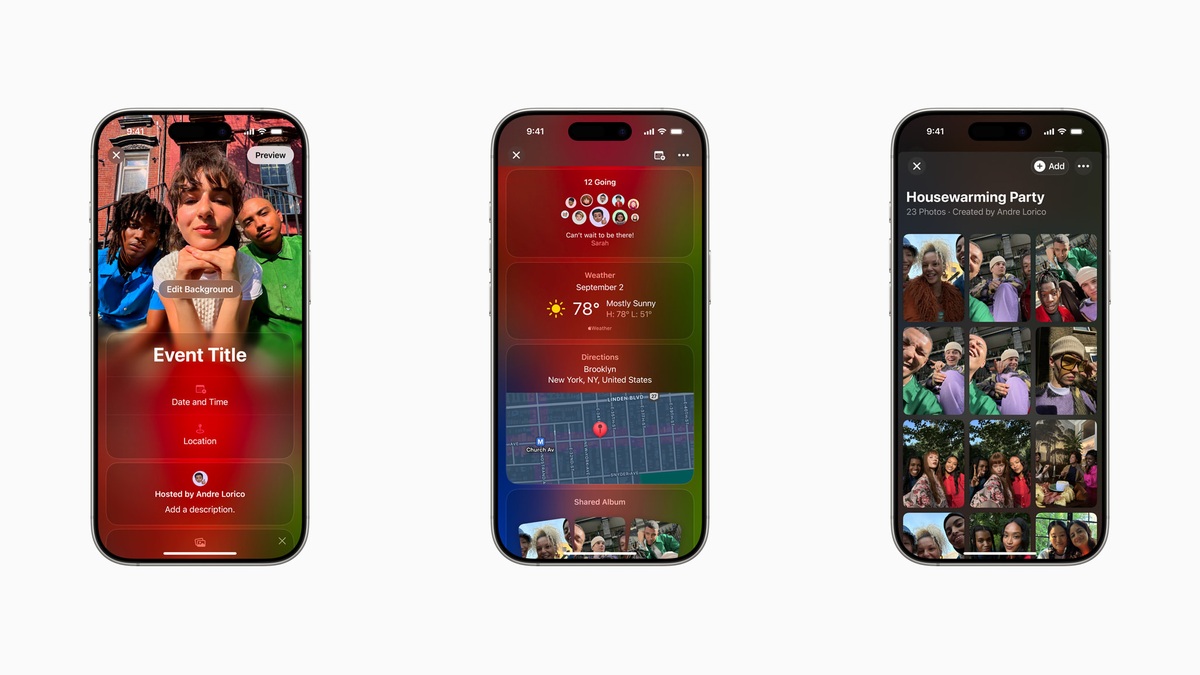
Three changes in the Apple Invites update
Apple’s current App Store release notes describe three main additions. The update arrived at the end of September, so these features are available now rather than a preview of a future release. Apple also lists routine bug fixes and performance improvements.
- Full-resolution albums: event participants can share photos with more detail directly through Invites.
- More background styles: Image Playground supports a wider range of looks, including photorealistic images.
- Email-link verification: guests who need to verify an address can follow a link in their inbox instead of typing a code.
The first change should interest hosts who want an event album that remains useful afterward. Meanwhile, the email change removes a small but familiar hurdle: switching between an invitation and an inbox to copy a verification code.
Photo sharing reaches beyond iPhone guests
Apple says people without an Apple device can join and contribute to the updated albums. That makes the event link more useful for groups with different phones. It also gives a host a common destination for pictures instead of several separate message threads.
However, replying to an invitation and contributing media have different requirements. Apple’s album documentation says adding photos or videos requires an Apple Account after an RSVP. Guests should not assume that account-free event access also means account-free uploads.
Event albums and your Photos library
Invites organizes its album around a particular gathering. Apple’s guide describes an album that a host adds to the event, which guests then join. For example, this suits a birthday or a family reunion where several people took pictures.
If you are also updating a regular album in the Photos app, our step-by-step guide to upgrading Shared Albums in iOS 27 covers that separate workflow. Keeping the two contexts clear helps you decide where guests should contribute.
What hosts still need to know
An iCloud+ subscription remains part of hosting
According to Apple’s introduction to Invites, creating and hosting an event requires iCloud+. Receiving and responding to an invitation remains free. Guests can access events through a browser on different devices, with or without an Apple Account.
Apple Invites update availability
Apple also notes that some features vary by region. Before planning around an AI-generated background, check the options your phone offers. A standard photo background remains a straightforward choice when you want a predictable result.
The Apple Invites update is a useful refinement, not a replacement for the service’s basic rules. Hosts gain better album sharing and guests gain easier entry. For a mixed-device group, the clearest invitation still explains where to RSVP and where to add photos.
Expand Your Knowledge:
 iOS 26.1 Update: Apple Adds Clearer Design, Smarter Controls, and More AI Languages
 Apple Unveils iOS 17.1.1 Update: What’s New?
 Apple Music to Receive New Features in iOS 18 Update
 Discover 4 Free iPhone Lifestyle Apps That Will Make Your Life Easier
 Apple Rolls Out iOS 17.4 Update: Discover the Latest Features for iPhones
 Apple Releases iOS 17.5 Update: Discover the Latest Features for iPhones
 Apple Releases Critical watchOS 10.1.1 Update: Resolving Significant Battery Issue
 How to View Email Full Screen on iPad
 How to Hard Reset iPhone 11 Full Guide
 NASA’s Artemis II iPhone 17 Pro Max Photos Bring Moon Mission Closer to Earth