
Make a Temporary iCloud Backup Before Switching iPhones
If you bought a new iPhone and your current iCloud plan has too little space for a backup, Apple can give you extra room for the move. Start the temporary iCloud backup on your old phone. The important detail for anyone waiting on a delivery is that Apple gives you 21 days to restore it, so plan around when you will have both devices.
Check eligibility on the old iPhone
Apple’s temporary storage guide covers a newly purchased iPhone or iPad, with extra space offered if your existing iCloud storage is insufficient. Update the old iPhone to the latest software available for it and make sure you know the Apple Account sign-in details you use on it. Keep the old phone until you have restored the backup on the new one.
Create the temporary backup
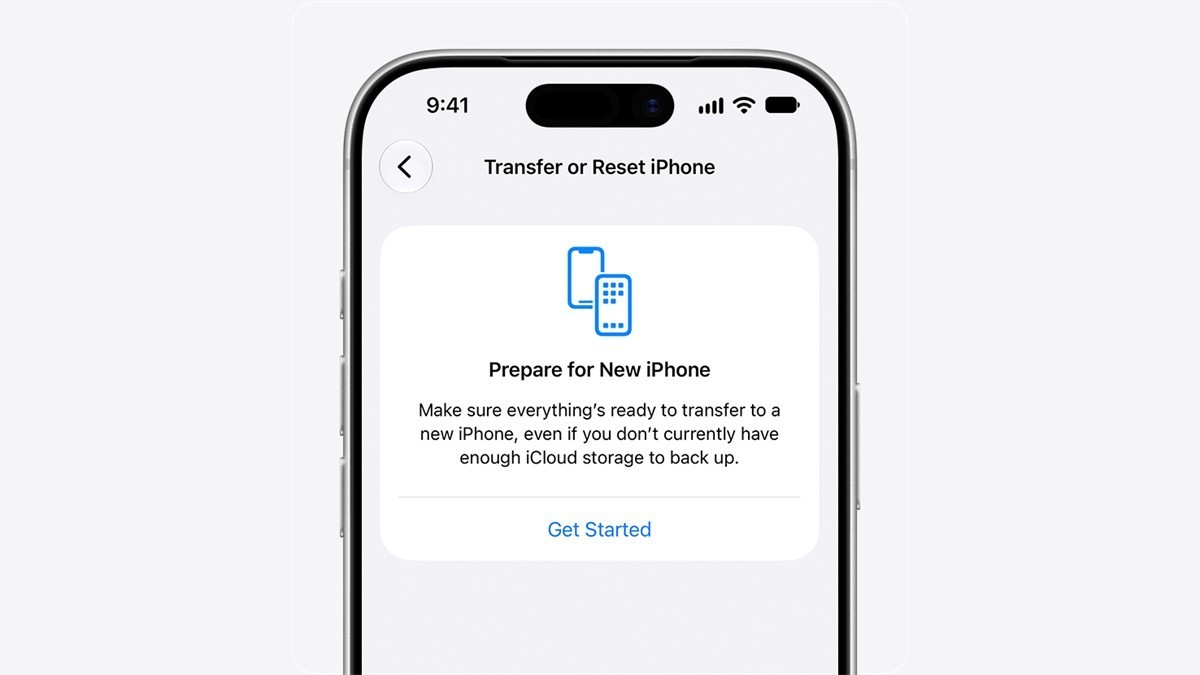
- On your old iPhone, open Settings and tap General. Scroll down to Transfer or Reset iPhone.
- Under Prepare for New iPhone, tap Get Started. If iCloud Backup is off, tap Turn On Backup to Transfer.
- When the prompt offers free extra iCloud storage, tap Continue. If you have enough space of your own, Apple says that extra-storage notice will not appear.
- Wait for the backup to finish. Keep the old iPhone intact, even if you are planning to trade it in.
Restore it while setting up the new phone
- On the new iPhone, follow setup until you reach the Apps & Data screen. Tap Restore from iCloud Backup.
- Sign in to your Apple Account and choose the most recent iCloud backup.
- Wait for the restore to finish before erasing the old phone. Open the apps that matter to you and check that your accounts and data are there. If a contact seems to be missing, check which account holds it before assuming the restore failed.
What to do if the delivery slips
If the new iPhone will arrive after the first 21 days, open Settings on the old iPhone and tap Keep My Backup Longer. Apple says this gives you another 21 days to restore. Contact Apple Support if you need more time. Once you have restored the temporary backup, Apple keeps that copy available for seven more days. The simplest trade-in plan is to allow time to complete the restore and check what came across while you still have the old phone in hand.