iPhone
How to Avoid International Roaming Charges on iPhone
Data roaming, or using your smartphone abroad on another network than you own, can cost hundreds or even thousands of dollars sometimes, even if all y…

Data roaming, or using your smartphone abroad on another network than you own, can cost hundreds or even thousands of dollars sometimes, even if all y…
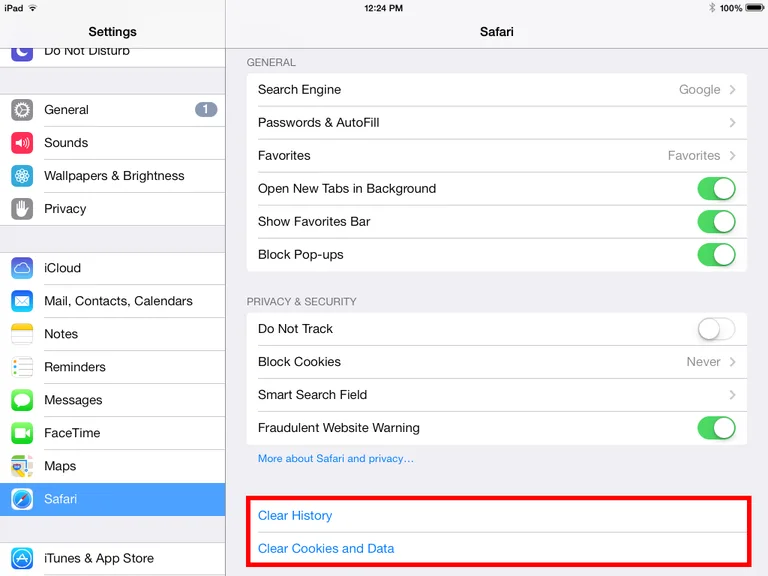
Clearing the cache on your iPad is like pressing the restart button – it clears up the RAM and gives you a fresh new start. It’s good to clear the cac…
Emoticons are a well-hidden feature of the iPhone that enhances SMS and iMessages and can be used in almost any application that involves typing. Help…
You’ve probably heard already of various methods of jailbreaking an iPhone, and you might have been tempted at least once to use a jailbreaking tool t…
Schools that allow students and teachers to use the iPad in the classrooms can improve the efficiency of their education. Although more and more schoo…
Whether you want to de-clutter your screens or free up some HD space, removing apps on the iPad is a quick and easy process that doesn’t even require …
What is TTY on iPhone? Out of users who are new to their iPhone have begun to see a TTY simple pop-up in the status bar in specific areas, and aren’t …
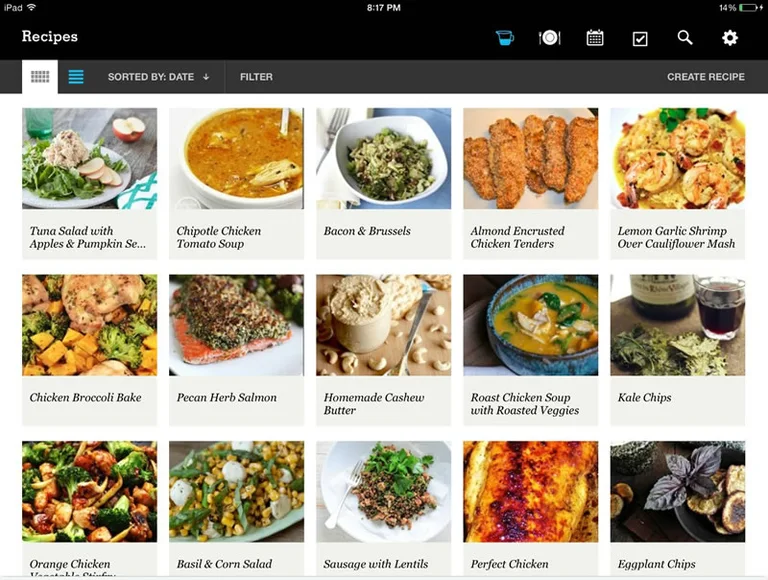
Too busy? Have a difficult time planning your meals? The PepperPlate App can come to your rescue. If you’re one of those who often end up grabbing a q…
Safari gives you a wonderful browsing experience on the iPad, iPhone, and iPod Touch. At present, you cannot set another browser as the default. Howev…
With the new 1Password app, you can easily keep track of the login names and passwords of all your online accounts. This is a universal app for iPhone…
The basics of iPhone wireless charging One of the biggest issues the iPhone – and any powerful smart phone, really – has to contend with on a regular …
iOS is way cooler than any other operating systems out there in the market. That’s just a layman’s opinion; the fact is that the iPhone is probably mo…
The iPad is not only a versatile device for entertainment and web surfing, but with the right apps it can also be a powerful educational tool that hel…
The iPhone is beautiful but vulnerable. It might have a scratch-resistant screen and a tough case, but it can easily get damaged, and in time, if not …